Threat detection and response for Cilium.

Expose lateral movement, DNS tunnelling and data leaving the cluster, from what Cilium and Hubble already see. Contain a compromised workload in one click.
  • No sidecars or node agents
  • Zero inbound ports required
  • ATT&CK-mapped detection
  • Full fleet visibility

Works with the stack you already run

  • Kubernetes
  • Cilium
  • Hubble
  • k3s
  • Helm
  • Prometheus
  • GitHub
  • GitLab
  • Terraform
  • Slack
  • Amazon EKS
  • Google GKE
  • Azure AKS
  • Red Hat OpenShift
  • Oracle OKE
  • RKE2
  • Any SIEM via syslog

why-cilera

Cilium already sees the attack. Nobody is watching.

Cilium sees every connection your workloads make. Why we built Cilera →

  1. Hubble records everything. Nobody reads it.

    Every connection is there, one cluster at a time, in a short buffer. Unless someone is watching, an attack leaves little behind.

  2. Cilium enforces what you wrote, not what you meant.

    A broad rule quietly leaves paths open, and nothing shows what one compromised pod could reach.

  3. Containing a workload means writing policy under pressure.

    During an incident, that means hand-written YAML against production, with no second chance.

Cilera watches it for you with 18 threat rules, shows how far a compromised workload could reach, and contains it in one click. On the Cilium you already run.

  • Open-source Cilium on EKS, GKE, AKS and self-managed clusters
  • GKE Dataplane V2, AKS, OpenShift and OKE (preview)
  • No new CNI, no enterprise distribution
  • One unprivileged pod, outbound HTTPS only
  • Free

capabilities

Detect, investigate and contain

Built on what Hubble already collects.

~/threats

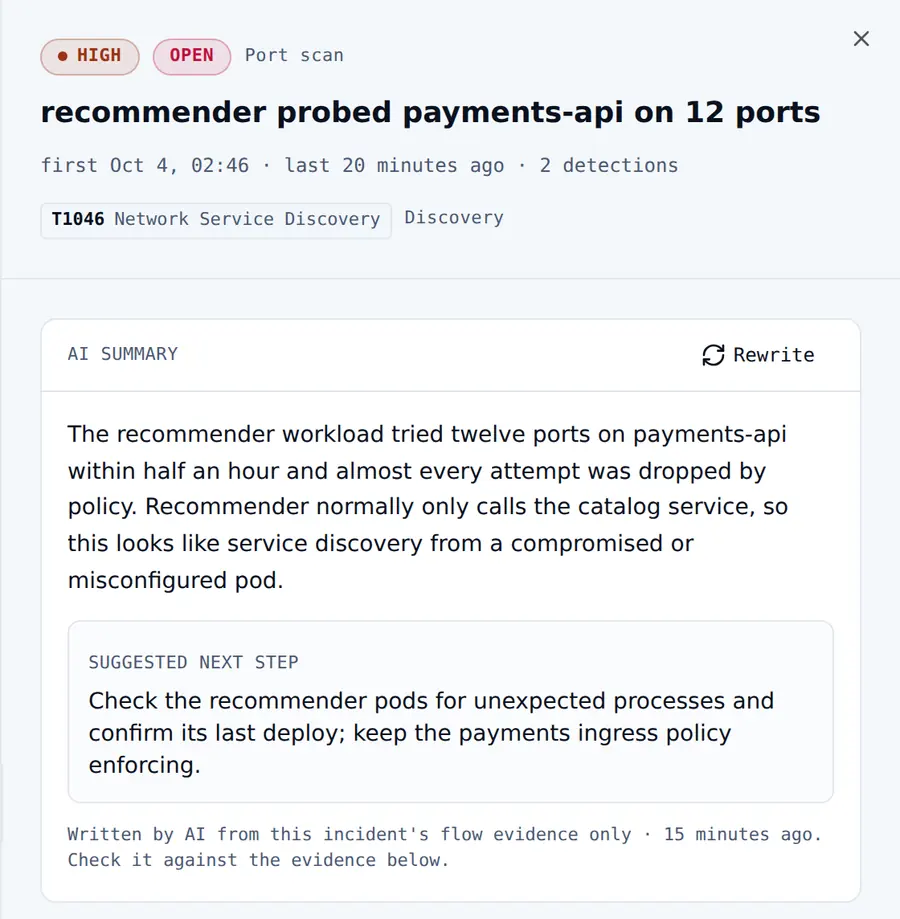
Detect attacks from network, HTTP and DNS activity

Attacks surface as incidents your team can act on, not raw flow logs.
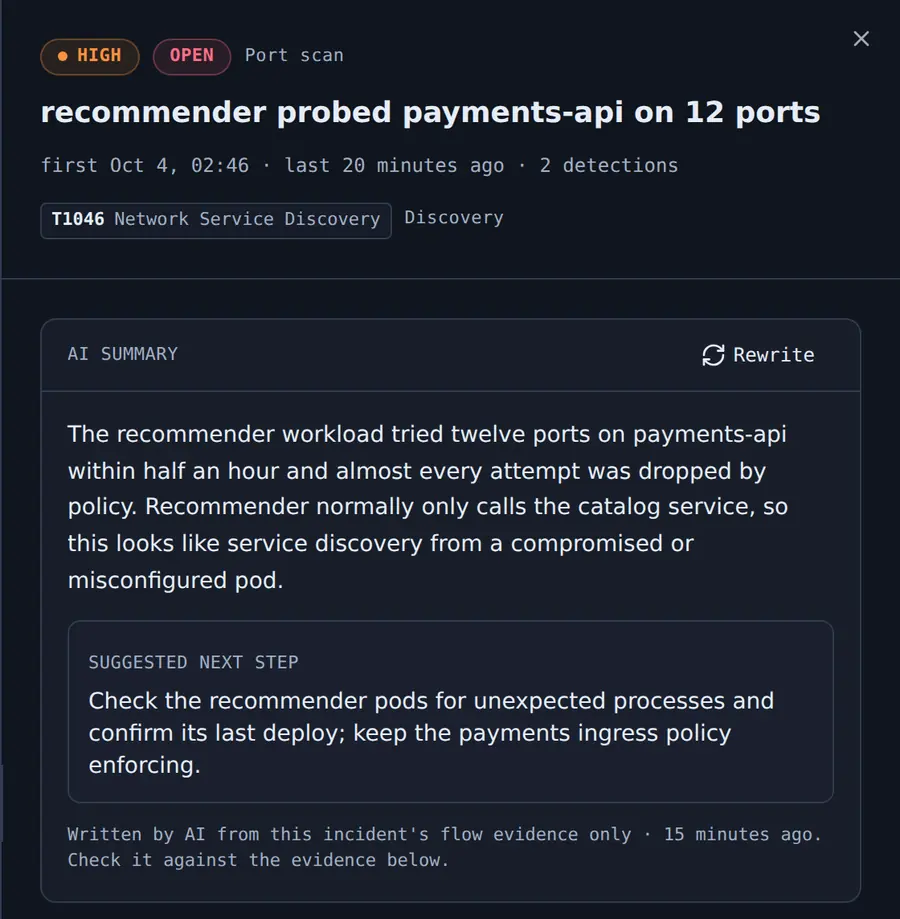
  • Lateral movement, scans, DNS tunnelling and data leaving the cluster
  • Known command-and-control and malware hosts, from threat intelligence
  • Evidence and a MITRE ATT&CK technique on every incident
  • A plain-language AI summary and a suggested next step
A high-severity port-scan incident mapped to MITRE ATT&CK technique T1046, with an AI-written headline and facts from the incident's flow evidence, a separate suggested next step, and why the rule fired.A high-severity port-scan incident mapped to MITRE ATT&CK technique T1046, with an AI-written headline and facts from the incident's flow evidence, a separate suggested next step, and why the rule fired.
~/containment

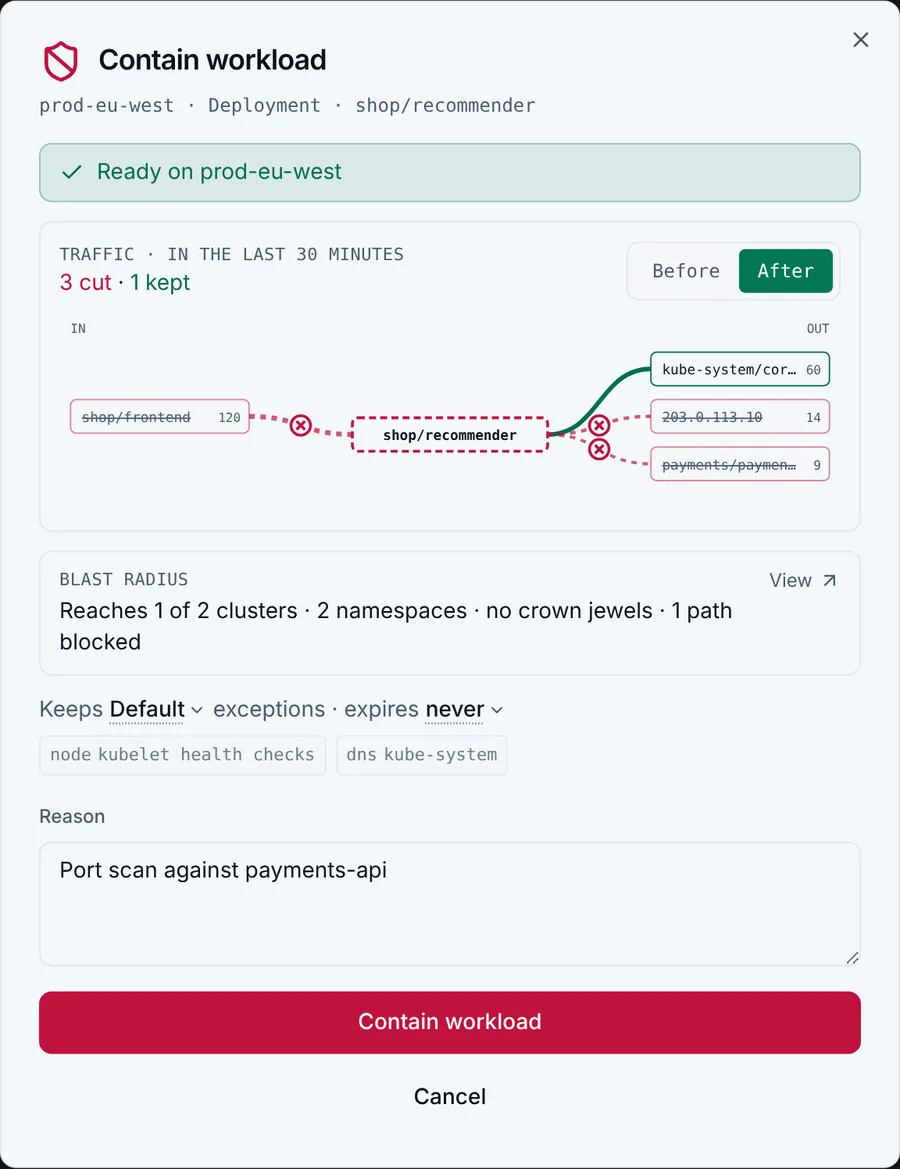
Contain a compromised workload in one click

Cut a compromised workload off the moment you decide to.
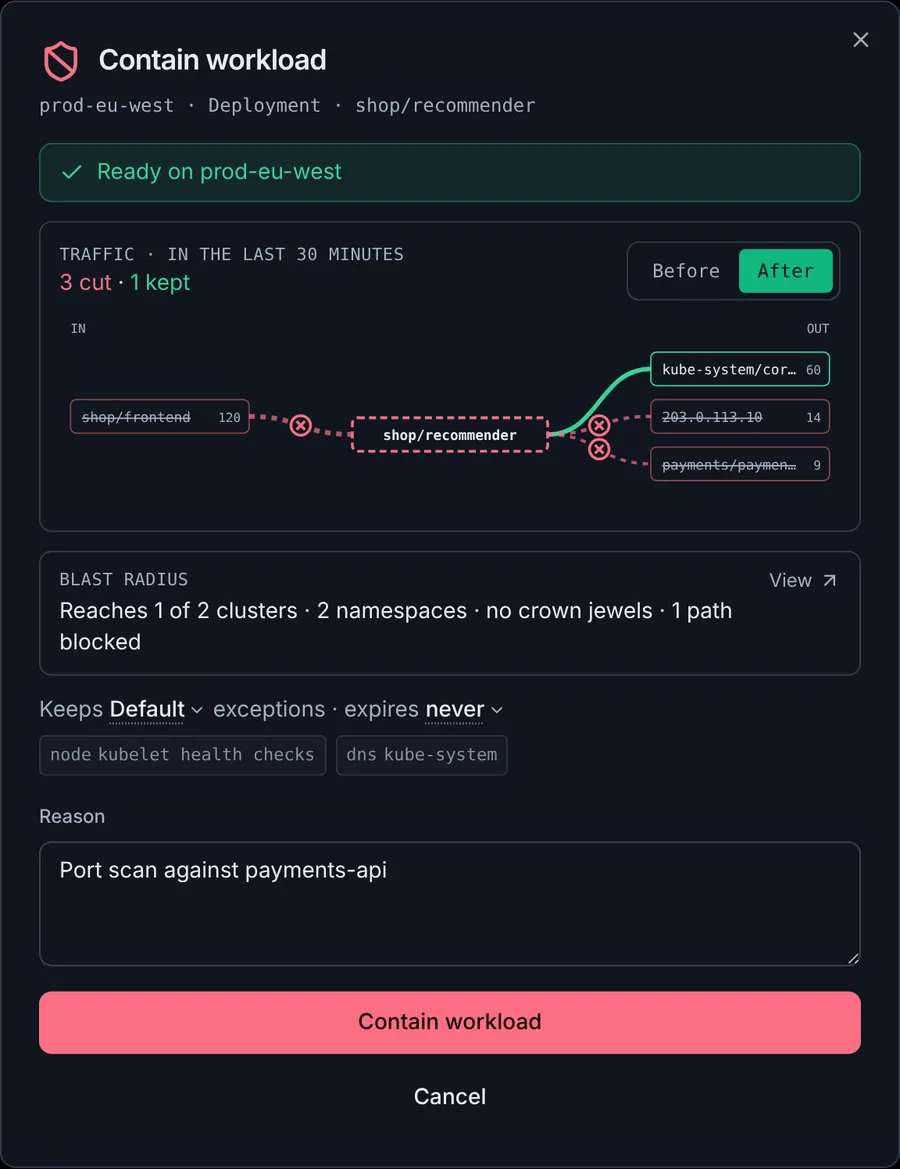
  • Isolated within 30 seconds, released in one click
  • DNS, the node and chosen services stay reachable
  • Your own policies are never touched
The Contain workload dialog for the recommender Deployment in the shop namespace of prod-eu-west: a before and after traffic view with three connections cut and DNS kept, its blast radius, the Default exclusion policy keeping the node and kube-system DNS reachable, and a reason for containing it.The Contain workload dialog for the recommender Deployment in the shop namespace of prod-eu-west: a before and after traffic view with three connections cut and DNS kept, its blast radius, the Default exclusion policy keeping the node and kube-system DNS reachable, and a reason for containing it.
~/ai

Catch AI traffic hiding in your containers

Every AI call is a path for your data to leave. See the AI traffic nobody approved, and stop it.
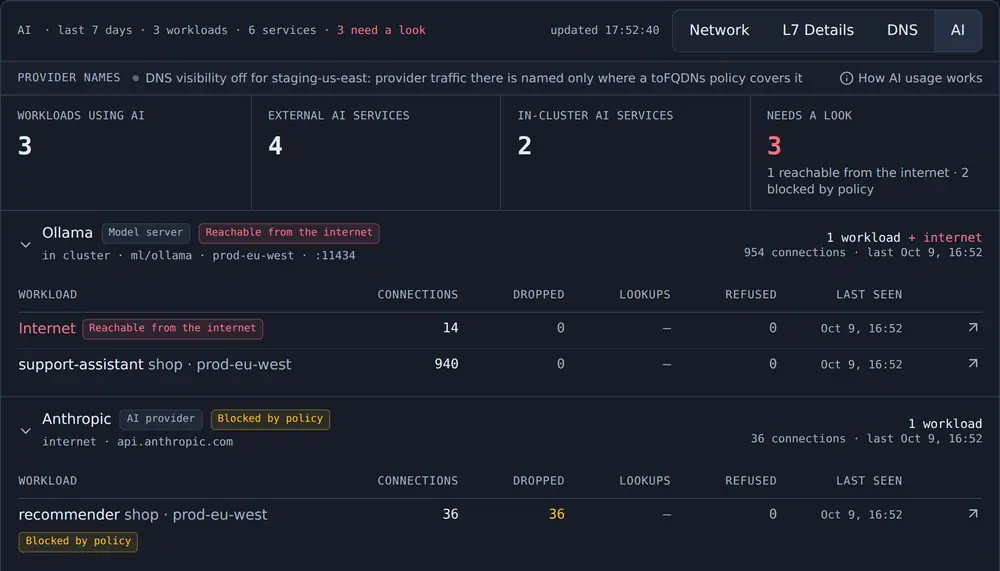
  • Every AI service your containers reach, approved or not
  • AI agents probing new internal services, flagged as threats
  • Model servers exposed to the internet
  • One-click containment. Never reads prompts
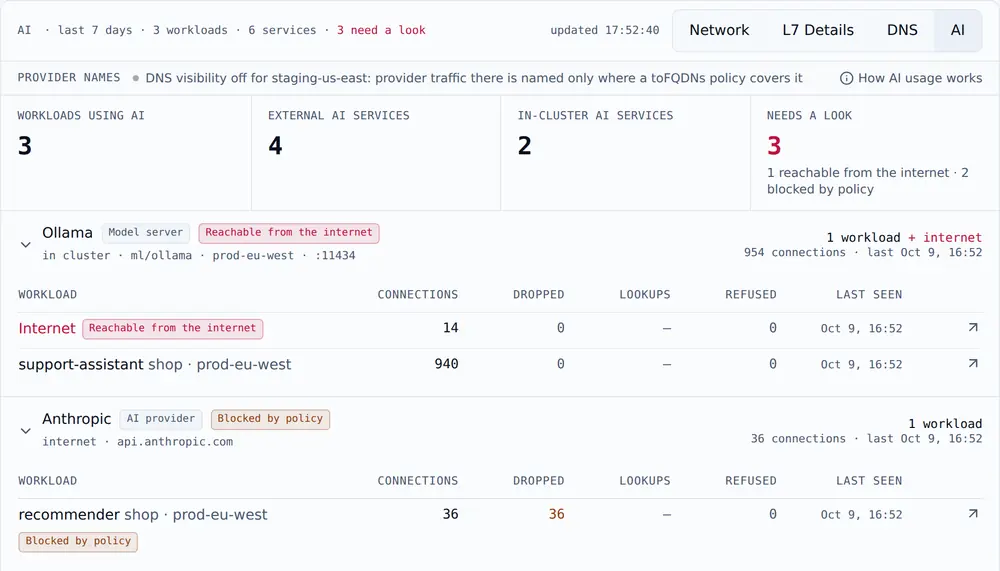
Traffic, AI view: 3 workloads use AI and 3 need a look. An Ollama model server reachable from the internet is listed first, then Anthropic, blocked by policy for the recommender workload.Traffic, AI view: 3 workloads use AI and 3 need a look. An Ollama model server reachable from the internet is listed first, then Anthropic, blocked by policy for the recommender workload.
~/blast-radius

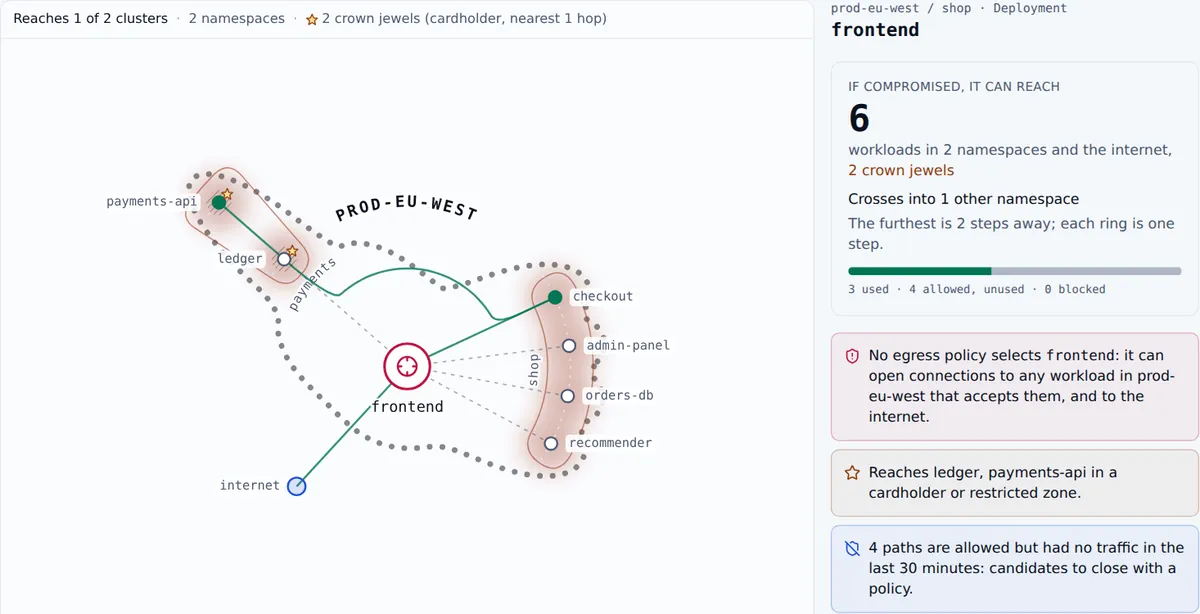
See how far a compromised workload could reach

See how far a breach could spread, before it happens.
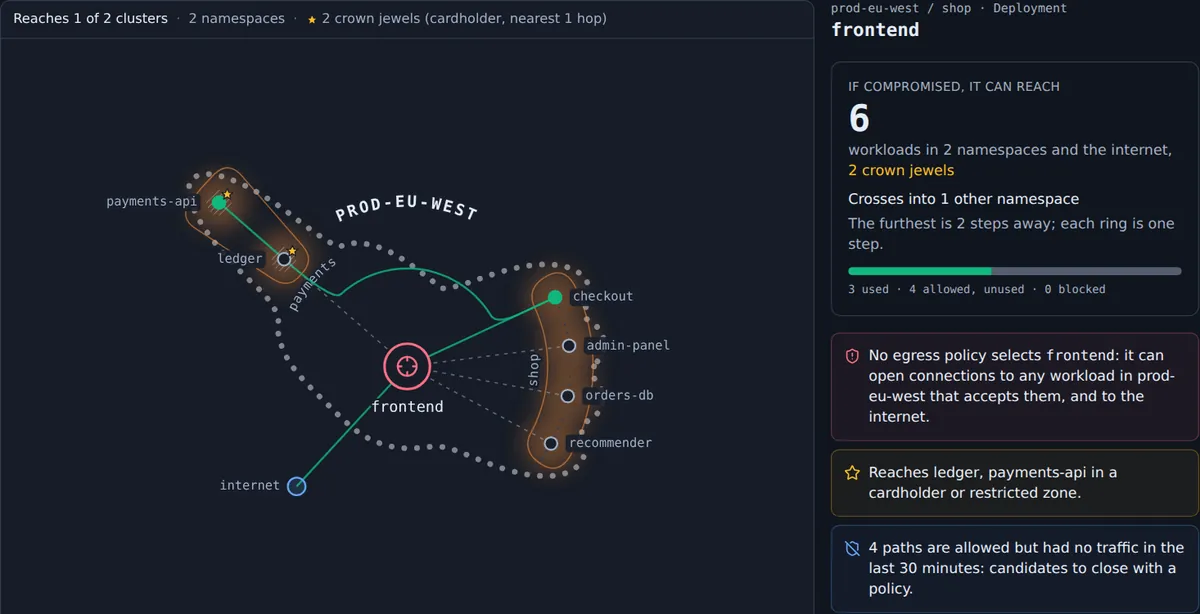
  • Every reachable workload, hop by hop, under your real policies
  • Open paths nobody uses, ready to close
  • Crown-jewel zones in reach, called out
Blast radius of the frontend workload in prod-eu-west: it could reach 6 workloads in 2 namespaces and the internet, including 2 crown jewels in a cardholder zone, with the paths it used drawn solid and the allowed but unused ones dashed.Blast radius of the frontend workload in prod-eu-west: it could reach 6 workloads in 2 namespaces and the internet, including 2 crown jewels in a cardholder zone, with the paths it used drawn solid and the allowed but unused ones dashed.
~/map

One map across every cluster

See how every cluster, namespace and workload really talks to each other, with new, blocked and silent paths standing out at a glance.
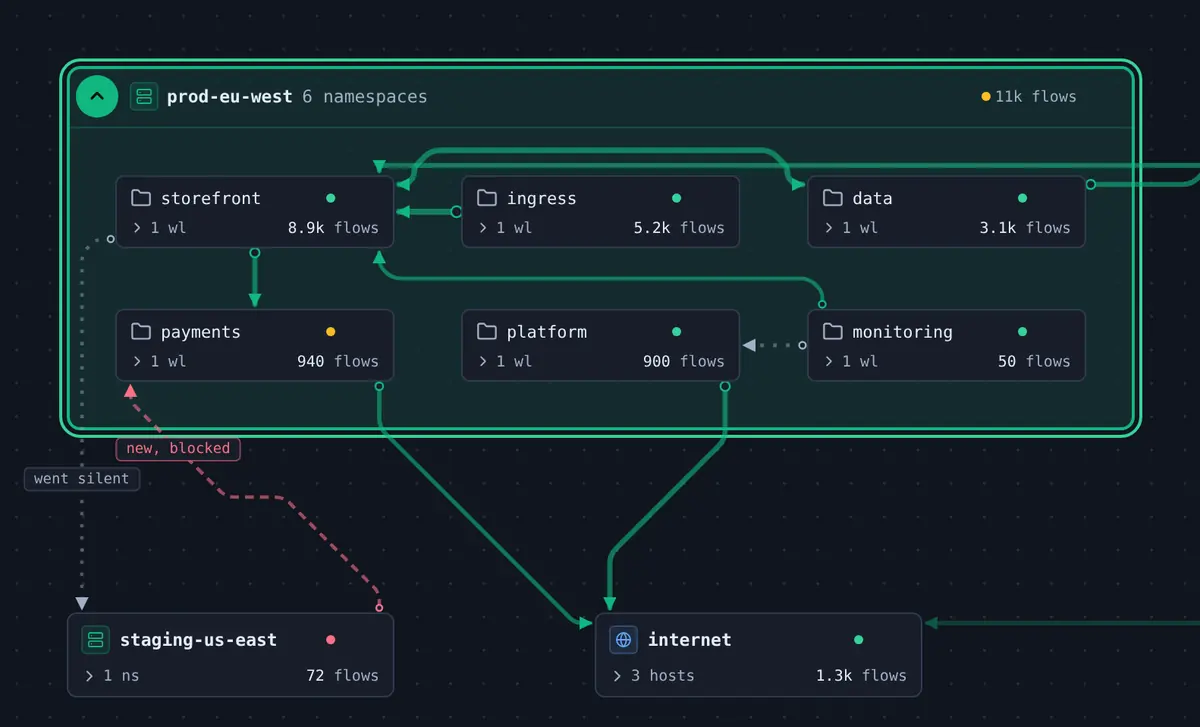
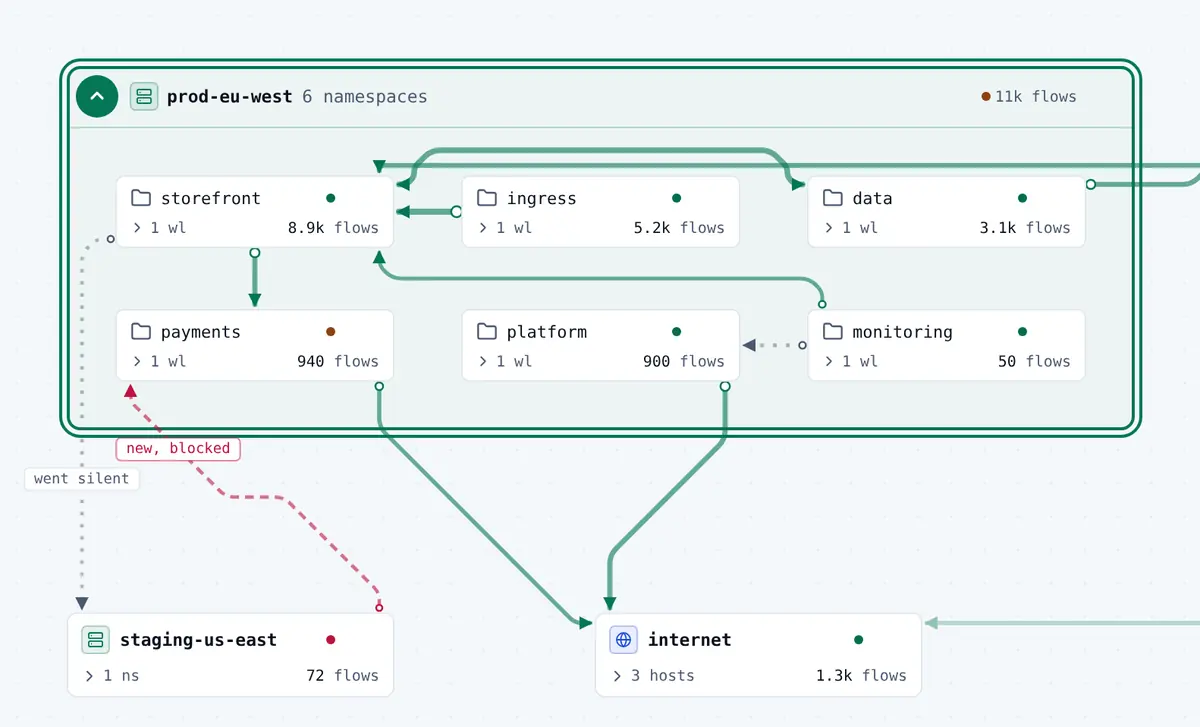
  • See namespace and workload relationships in every cluster
  • Traffic between clusters and out to the internet, on the same view
  • New, blocked and silent paths flagged right on the map
  • Path tracing between any two workloads, with verdict and policy
Multi-cluster map with the prod-eu-west cluster expanded in place, showing six namespaces and the links between them, a new blocked path from the staging-us-east cluster, a path that went silent, and egress to the internet.Multi-cluster map with the prod-eu-west cluster expanded in place, showing six namespaces and the links between them, a new blocked path from the staging-us-east cluster, a path that went silent, and egress to the internet.
~/changes

Compare current traffic with a baseline

Know what changed, not just what is happening.
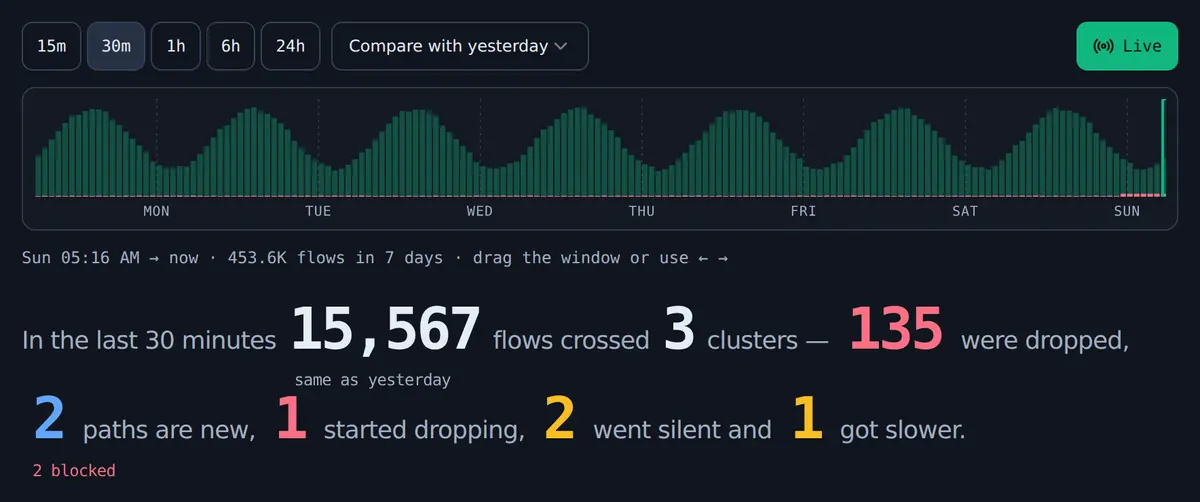
  • Every path compared with yesterday
  • New, silent, dropping and slower paths flagged
  • Seven days of history to look back through
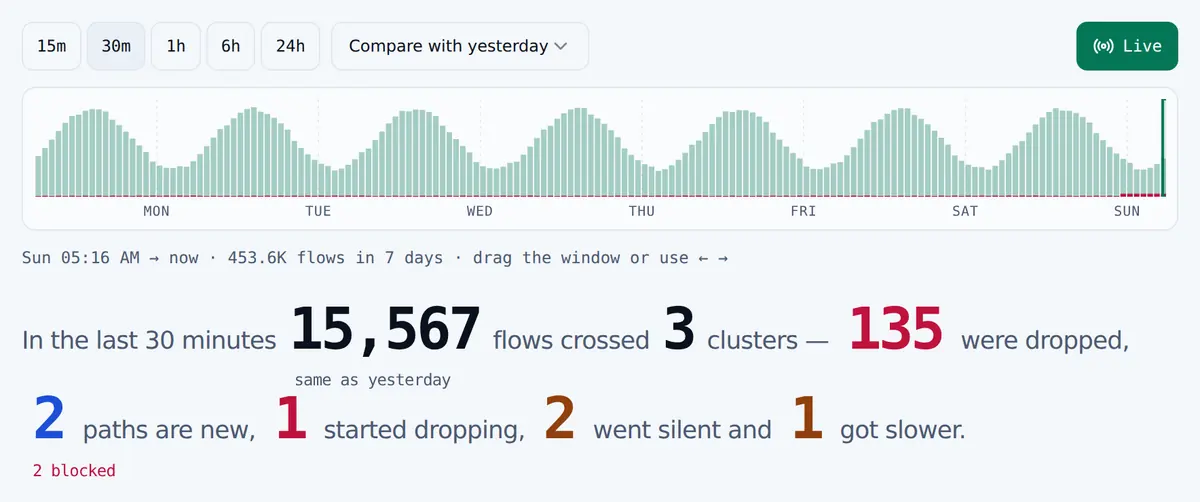
Seven-day flow histogram with window controls from 15 minutes to 24 hours and a compare-with-yesterday baseline, above a summary of the last 30 minutes: flows, drops, and how many paths are new, started dropping, went silent or got slower.Seven-day flow histogram with window controls from 15 minutes to 24 hours and a compare-with-yesterday baseline, above a summary of the last 30 minutes: flows, drops, and how many paths are new, started dropping, went silent or got slower.

See every feature

before-an-attack

Reduce what one compromised workload can reach

Cilium enforces your policies. Cilera reveals exposure, maps workload access, identifies policy gaps, detects violations, and prioritizes remediation.

  1. ~/posture

    Segmentation Posture

    Measure segmentation coverage, identify exposed workloads, and uncover gaps between intended and actual isolation.

  2. ~/access

    Workload Reachability

    Map workload-to-workload communication and reveal the paths an attacker could exploit to move laterally.

  3. ~/policies

    Policy Intelligence

    Analyze Cilium and Kubernetes network policies to expose excessive permissions, unused rules, and unintended access.

  4. ~/violations

    Threat & Violation Detection

    Identify policy violations, unexpected traffic, lateral movement indicators, and suspicious egress activity.

  5. ~/recommendations

    Remediation Intelligence

    Prioritize security gaps and recommend actionable policy changes to reduce exposure without disrupting legitimate workload communication. Recommended by Cilera. Applied by you.

hubble-and-cilera

What Hubble gives you, and what Cilera adds

Cilera reads flows from Hubble Relay in each cluster. Hubble and Hubble Relay stay as they are.

Cilera

Threat detection and response, across every cluster

  • Detect18 threat rules mapped to MITRE ATT&CKNetworkHTTPDNS
  • RespondContain a workload in one clickOwner or admin starts it
  • Blast radiusWhat a workload could reach
  • Fleet mapEvery cluster on one map
  • Change detectionNew paths against a baseline
  • CompliancePCI DSS, SOC 2, NIST, CIS

cluster: prod-eu

  • Cilera operator1 pod
  • Hubble + Relayobserves flows
  • Ciliumenforces policy
  • Linux kernel · eBPF

cluster: prod-us

  • Cilera operator1 pod
  • Hubble + Relayobserves flows
  • Ciliumenforces policy
  • Linux kernel · eBPF

+ more clusters

One operator pod per cluster sends flows, policies and labels out over HTTPS. In the cluster it writes only its own state and, when you contain a workload, one deny-only policy.

Hubble gives you

  • Live flows, per cluster.
  • A service map per cluster in Hubble UI.
  • Multi-cluster views through Cluster Mesh with Hubble Relay.

Cilera adds

Threat detection
Detection across network flows, HTTP and DNS: scans, lateral movement, new exposure and egress, DNS tunnelling and known-bad hosts, mapped to MITRE ATT&CK.
Containment
Cut a compromised workload off with a deny-only Cilium policy, when an owner or admin decides.
Blast radius
What one workload could reach under your policies, hop by hop.
Fleet-wide map
Every cluster on one map, without Cluster Mesh.
Change detection
New, silent, dropping and slower paths against a baseline.
Segmentation and compliance
Zero-trust segmentation checks, with PCI DSS, SOC 2, NIST and CIS evidence every 15 minutes.
Policies
Cilium and Kubernetes network policies in plain language.
Cluster insight
Cilium configuration for each cluster.

onboarding

Easy to install, secure by default

One cluster or your whole fleet. Same command, same values file.

One Helm chart
No sidecars. No code changes.
Outbound only
HTTPS out. Nothing connects in.
Short-lived tokens
Signed and self-expiring. Each cluster gets its own credential.
Fleet-ready
One token for many clusters. Works with Argo CD.

how-it-works

From deployment to detection and response

Deploy Cilera alongside Cilium to gain visibility into workload communication, uncover security gaps, detect threats, and take action without modifying your applications.

  1. 01 Deploy

    Install Cilera into your Kubernetes environment using a Helm chart.

  2. 02 Connect

    Securely connect your cluster to Cilera for network and policy intelligence.

  3. 03 Discover

    Build a view of workload communication, network policies, and permitted access.

  4. 04 Analyze

    Identify excessive permissions, unexpected connections, and segmentation gaps.

  5. 05 Detect

    Surface policy violations and suspicious network activity across workloads.

  6. 06 Respond

    Prioritize remediation and apply policy changes to contain unwanted access.

teams

Built for platform, security and compliance teams

role=platform-sre

Platform and SRE teams

Find why a connection fails, and since when, in any cluster.

role=security

Security teams

Catch lateral movement, scans and data leaving the cluster, with evidence, then contain the workload in one click.

role=compliance

Compliance teams

Segmentation and encryption evidence every 15 minutes, from observed traffic.

integrations

Fits the tools you already run

Send what Cilera finds to where your team already works.

  • GitHub

    Policy checks and pull requests

    See what a policy change would block, in the pull request, before it merges.

  • Terraform

    Configuration as code

    Alert channels, SIEM destinations and suppressions as code. Available on request.

  • Slack

    Alerts by email or Slack

    Incident alerts by email or to the Slack channel you choose.

  • SIEM

    Events to your SIEM

    Incidents and audit events to any SIEM, over syslog with TLS.

  • Webhooks

    Signed webhooks

    Incidents as signed JSON to any HTTPS endpoint.

  • REST API

    API and tokens

    Expiring tokens for scripts and pipelines, with every write audited.

security

What runs in your cluster, and what leaves it

One small pod per cluster, with the least access it needs.

  • Read-only. It never changes your workloads or policies; it acts only when you contain one.
  • Locked down. Non-root, distroless, read-only filesystem.
  • Outbound only. Nothing connects into your cluster.
  • Metadata, not payloads. Flow counts and labels, never packet contents.
  • Sensitive detail is opt-in. HTTP and DNS detail stay off until you turn them on.
  • Isolated. Every cluster has its own credential, every tenant its own data.
Full security details
cilera-operator pod
# set by the chart
securityContext:
  allowPrivilegeEscalation: false
  readOnlyRootFilesystem: true
  capabilities:
    drop: [ALL]
podSecurityContext:
  runAsNonRoot: true
  runAsUser: 65532
  seccompProfile:
    type: RuntimeDefault

faq

Frequently asked questions

The short answers. The Security page and install guides have the detail.

--what-does-cilera-costWhat does Cilera cost?

Nothing. Cilera is free and in early access. If we add paid plans later, for larger fleets or longer history, we will announce them well in advance.

--how-does-cilera-relate-to-hubbleHow does Cilera relate to Hubble?

Cilera runs on Hubble's flow data. Hubble shows you the flows; Cilera watches them for threats, contains compromised workloads and puts every cluster on one map.

--does-cilera-help-with-zero-trust-and-microsegmentationDoes Cilera help with zero trust and microsegmentation?

Yes. Cilium enforces your policies; Cilera shows whether traffic matches the segmentation you intended, and what each workload could still reach.

--which-cilium-setup-is-requiredWhich Cilium setup is required?

Cilium as the CNI, with Hubble and Hubble Relay enabled. The install guides cover EKS, GKE, AKS, OpenShift, OKE, self-managed and kind clusters.

--what-data-leaves-my-clusterWhat data leaves my cluster?

Flow counts and workload labels, never packet contents or your pods' IPs. HTTP and DNS detail are opt-in and scrubbed inside the cluster. The Security page lists everything.

--does-cilera-change-anything-in-my-clusterDoes Cilera change anything in my cluster?

Your workloads and policies, never. The only policy it writes is a deny-only containment, when an owner or admin starts one, and it is removed on release.

--is-cluster-mesh-requiredIs Cluster Mesh required?

No. Cross-cluster traffic is linked without it.

--what-network-access-does-the-operator-needWhat network access does the operator need?

Outbound HTTPS only. Nothing connects into the cluster.

--how-long-is-data-retainedHow long is data retained?

7 days of flow detail and history, 30 days of incidents and compliance history, and 12 months of audit log.

--which-compliance-frameworks-are-coveredWhich compliance frameworks are covered?

PCI DSS v4.0, SOC 2, NIST SP 800-53 and the CIS Kubernetes Benchmark, with automated checks every 15 minutes and downloadable evidence.

--how-does-cilera-use-aiHow does Cilera use AI?

Only when you ask. It explains an incident and suggests a next step from that incident's evidence, sent to a third-party AI model. It never acts in your cluster.

get-started

Connect each cluster with one Helm chart

Cilera is in early access. Once you're in, the console gives you the command for each cluster.

install
$ helm upgrade --install cilera-operator <chart from the console> --version 0.11.0 -n cilera-system --create-namespace -f cilera-values.yaml
×

console

The Cilera console is in early access

The console is not yet publicly available. Request access at [email protected].

Request AccessKeep Exploring